Translate iXtran.net's XLF files in memoQ and Trados Studio
Last updated: March 2026
MEMOQ TRADOS STUDIO XLF XLIFF XML
Table of contents
Short introduction
We have moved away from RTF as an exchange format and migrated to XLF (XLIFF 1.2). XLF is an XML-based, industry-standard format designed to standardize how translatable data is exchanged between tools in the localization process. XML stands for eXtensible Markup Language and is "spoken" by almost all systems of our clients.
Translate in memoQ
There is nothing special to note here, just proceed as you would with MS Office or LibreOffice documents (.rtf, doc, .docx, .xls, .xlsx, .ppt, .pptx, .odt, .ods, and .odp).
Translate in Trados Studio (2021 and 2024)
Re-segmentation of XLF files
The XLF files you receive from us are already segmented. Trados does not always adopt the existing segmentation, but splits some segments into smaller parts.
There are many instructions circulating online on how to prevent Trados Studio from re-segmenting XLF files. We have tried some of the solutions suggested in internet but no one of them worked for us.
This is not really a problem for us. But if it is for you, please contact Trados Studio support—and share the solution if you get one that works.
What to do when the translation is finished
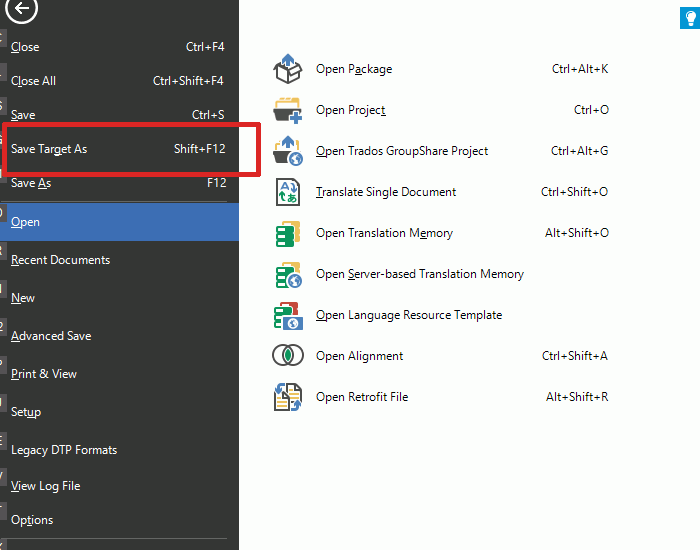
Go to the menu option File | Save Target As.
In the Save Target As dialog box, make sure that "XLIFF Document" is selected as the type of file.
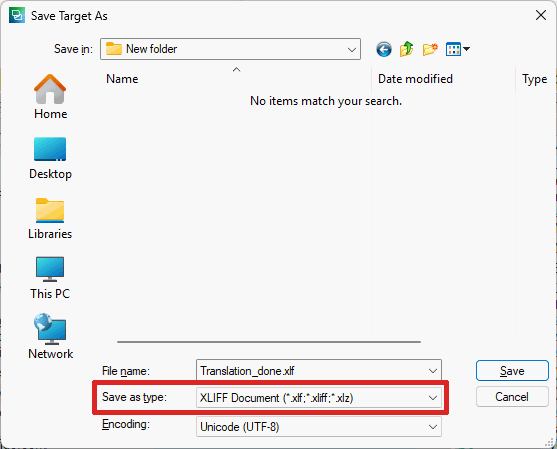
Click on Save and return the file with the extension .xlf to us.
Thank you!